


MyChat 2026.11 makes it easier to discuss tasks, share content, and connect with your team. The alternative client now features group video conferences and plugin support, while the web and alternative clients have received an updated message menu. Another convenient improvement: tables copied from Excel are now sent in the chat as actual tables rather than images.
- Video calls and message management
- Plugins and alternative client updates
- Security and reliability
- Various improvements
- Full list of changes + development history
- How to update to the latest version?
1. Video calls and message management
The alternative client now supports multi-participant video conferences. During a call, you can highlight the active speaker, turn off your camera, or join the conference from multiple devices. One-on-one calls and screen sharing views open in a separate floating window.
In the web and alternative clients, message actions are grouped into a context menu: copy, reply, forward, delete, or react. Tables copied from Excel are now sent as structured tables, making them easier to read in the chat.
2. Plugins and Alternative Client Updates
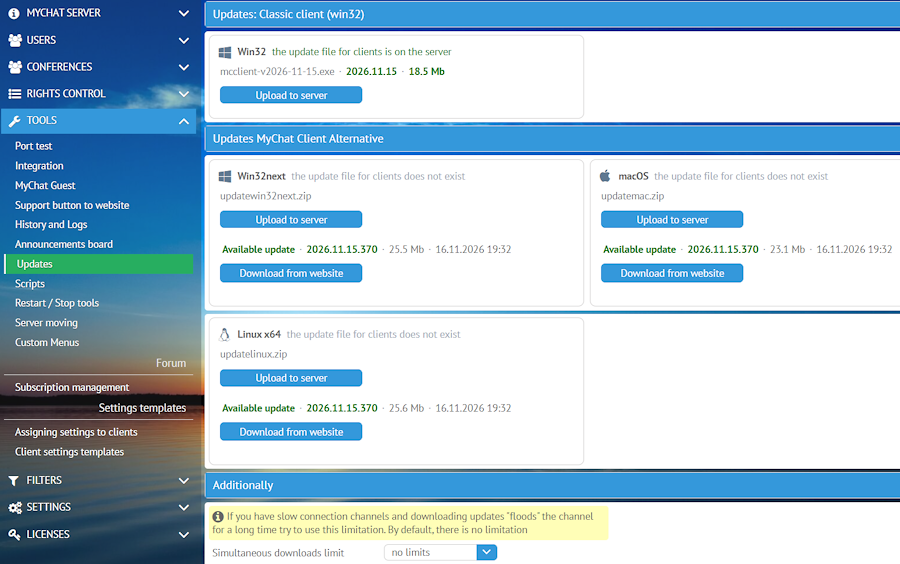
The alternative client can now be extended with plugins: you can connect, launch, and manage them. Updating the client has become more convenient: the update button is available directly in the chat, and the server administrator can download the update package from the website under "Tools" - "Updates":
3. Security and Reliability
Web authorization has been strengthened: sessions are bound to the client, their IDs are harder to predict, and requests are accepted only from allowed sources. Passwords are no longer stored in the browser for the "Remember me" feature, token login is protected against brute-force attacks, and file uploads require a valid current session.
Errors in link and external data handling, message delivery, and client shutdown have also been fixed. The server generates usage statistics faster without blocking history writing for a long time.
4. Various Useful Improvements
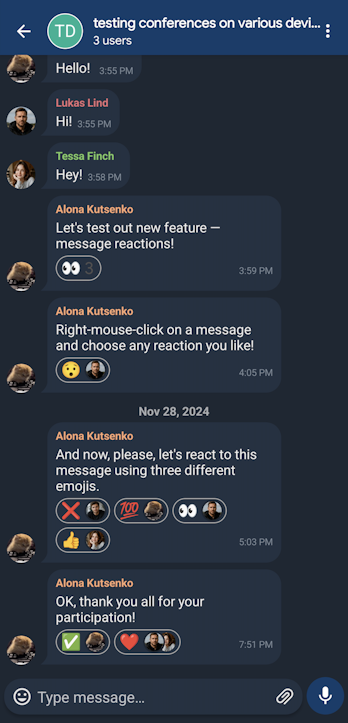
The Integration API now supports sending "silent" messages in private chats and conferences. The Android client features message bubbles:
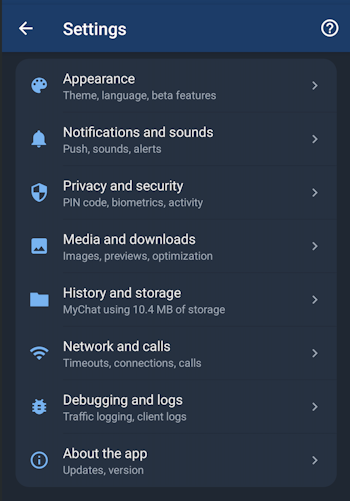
The settings screen has been redesigned:
The image viewer has also been updated in the Android application. For the alternative client, the installation of updates and handling of multiple downloaded files have been improved.
5. Full list of changes + development history
Development history with developers' comments
MyChat Client
[+] (web,alt) a table copied from Excel is sent as a table message rather than a plain image;
[+] (web,alt) new message context menu via right-click and the "..." button: copy, reply, forward, delete, reactions;
[+] (alt) client update button directly in the chat;
[+] (alt) alternative client plugin system: connecting, launching, and managing plugins;
[+] (alt) multi-participant video conferences;
[+] (android) a new message display mode has been added — messages can now be displayed as containers. To enable this mode, turn on the “Bubble message style” option under "Settings" → Appearance;
[*] (alt) video conferences: layout with a highlighted participant, complete camera turn-off, login from multiple devices;
[*] (web,admin,kanban,forum) passwords are no longer stored in the browser for "remember me";
[*] (web,alt) one-on-one video calls and screen sharing views open in a floating window;
[*] (android) the "Settings" screen has been redesigned and reorganized into groups;
[*] (android) the image viewer has been updated and can now also be closed with a vertical swipe;
[*] (alt) when downloading multiple files, the "file downloaded" notification is now displayed only for the last file;
[-] (forum) images in forum posts are loaded only via network URLs, while others are displayed as captions (protection against CVE-2026-111497);
[-] (alt) client protection against malicious Brotli-compressed data (CVE-2026-111497);
[-] (web,alt) fixed link boundaries in messages: links no longer capture adjacent text, and a cross-site scripting vulnerability in link captions has been closed;
[-] (win32) the /exit console command stopped working. Fixed;
[-] (win32) when switching to Google Chrome, opening the chat, and pressing Esc (or the UI close button) to minimize the application to the tray, Chrome would close. Fixed;
[-] (android) fixed an issue that caused the app to crash when attempting to open a notification containing a file;
[-] (web, alt) the progress indicator for sending a folder with files was not updating, making it appear as if the transfer does not work. Fixed;
MyChat Server
[+] (admin) in "Tools" - "Updates," added an option for the alternative client to download an "update package" from the website (nsoft-s.com/en);
[*] improved web authorization: sessions are bound to the client, session IDs are unpredictable, cross-origin requests are accepted only from allowed sources, and client IP addresses behind a proxy are determined uniformly;
[*] token login is protected against brute-force attacks;
[*] (Integration API) completed the implementation of sending "silent" messages via the API in private chats and conferences;
[*] (core) accelerated the server statistics calculation process;
[-] (node) IP address filter on HTTPS connections allowed everyone through;
[-] (node) following a network security audit, fixed the following vulnerabilities: service commands, an exposed external address retrieval handler, and server modules located in a publicly accessible folder;
[-] (node) file uploads to the server require a valid session;
[-] (core) sending "silent" messages in conferences did not work;
[-] (core) message race condition issue: sometimes when sending a private message, its status remained "sent" instead of changing to "received", even though the recipient was guaranteed to be online. Fixed.
6. How to update to the latest version?
Both commercial and free versions are updated in the same way. The server is updated first, then the clients. In general, this process is performed automatically.
