


The main news of this release is group calls in all MyChat client applications. At the same time, we added convenient preview snippets for YouTube links and video files, improved quoting, fixed several unpleasant bugs, and enhanced call performance.
And yes, the version turned out to be almost festive: May 13th is MyChat's birthday. The first version was released in 2004. In 2026, the product turns 22. A great moment to release a major communication feature that completes our corporate messenger.
MyChat 2026.3 is a release about live communication: faster calls, easier to understand who is speaking, safer to keep corporate communication within your own infrastructure, and more convenient to work with video directly in the chat.
- Audio conferences in all clients
- Group call security
- Preview for YouTube and video files
- Quoting quotes and useful things
- Fixes and stability
- Full list of changes + development history
- How to update to the latest version?
1. Audio conferences in all clients
Windows, macOS, Linux, Android, iOS, and browser. You can start a voice conference within a regular text conference and immediately connect colleagues to the conversation without using an external service or creating a separate meeting somewhere in the cloud.
Why is this useful? For example, a work conference is discussing an urgent issue: accounting, warehouse, tech support, sales department. Instead of a long message typing, someone starts a general group call and people connect directly from MyChat, quickly reach an agreement, and continue working in the same context where all the history, files, and messages are stored.
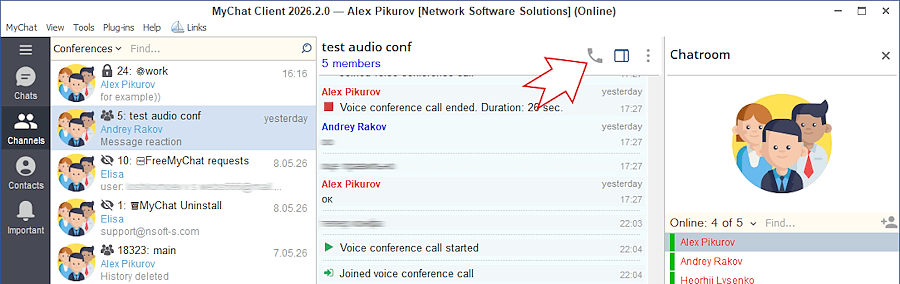
While the call is ongoing, you can send messages, screenshots, files — everything as usual. Only those who need it can join the general call. This is flexible and convenient. If you need to leave a call for a few minutes — you can do it, no need to ask "can I go?", like at school :)
Technology is based on WebRTC. This is a modern approach for real-time voice and video communication. It works well in unstable networks: the sound quality adapts to current conditions, so the conversation doesn't fall apart immediately if someone has weak Wi-Fi, mobile internet, or a overloaded channel.
The conference shows the call initiator, who is active, who has their microphone muted, who is silent, and who is speaking right now. Voice detection is provided for this feature. In large conversations, this is especially useful: no need to guess who said what as MyChat shows the active speaker.
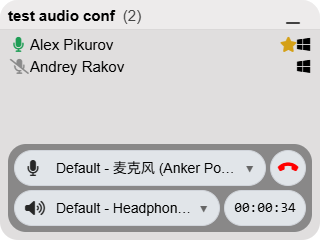
There is also a setting for microphone behavior when entering a group call. You can turn on the microphone immediately or connect with it muted to avoid joining the conversation with the sounds of the office, the road, or a meeting room. At first glance, for corporate communication, this seems like a small thing, but in practice, it significantly reduces noise and makes group calls calmer.
There is currently a limit on the number of participants in a voice conference in MyChat and it is up to 20 people. It all depends only on the performance of the server, client computers, and smartphones, as well as network quality. This is an honest model for a self-hosted product: the administrator controls the infrastructure and understands how many people their server is designed for.
For future versions, we plan to raise this limit to higher values.
After the call ends, MyChat generates a summary: who participated in the call, how long each person was in the conversation, and from which application they connected — Windows, browser, Android, macOS, Linux, or iPhone. The list of participants is sorted by participation time. This is convenient for work discussions: you can later see who was actually on the call and who just stopped by for a couple of minutes.
Thanks to our loyal users who have patience, those who wait will get everything :) Group calls were in beta for three years, it's time to release them to the world.
2. Group call security
MyChat is a self-hosted system. This means the server is located in your network: in the office, data center, closed corporate network, or on your VPS/VDS server. Voice conferences in MyChat do not pass through a third-party public cloud service where you do not control the infrastructure and data storage rules.
Even if the perimeter is closed completely without internet, or inside a VPN network — everything will work perfectly.
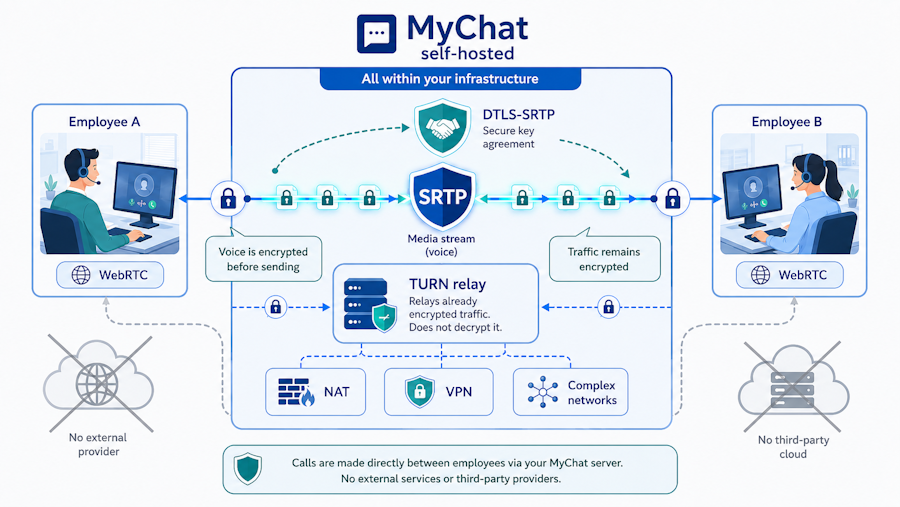
WebRTC automatically encrypts media streams. SRTP is used for voice transmission, and keys are negotiated via DTLS-SRTP. In simple words, voice packets are encrypted before being sent over the network, and the service key negotiation procedure is protected by mechanisms similar in meaning to TLS used in HTTPS.
If a TURN relay is needed for the connection, it automatically forwards encrypted media traffic and helps participants connect via NAT, VPN, and complex network schemes, but it does not turn the voice into an open stream for eavesdropping. For a third party that doesn't control your clients and server, intercepting the content of such a conference is practically impossible.
An important advantage of MyChat specifically as a corporate self-hosted solution: voice communication remains within your infrastructure and your security rules. No external conference provider, no transferring the conversation to someone else's cloud platform, no dependence on accounts in third-party services.
The phrase "corporate chat is here, calls are in Teams, and files are on Google Drive" is not about MyChat. We provide a finished product where everything works "out of the box".
3. Preview for YouTube and video files
In MyChat chats, YouTube links now look better and clearer. Instead of a bare link, you can see a clear snippet: the name of the video, the channel, and an image. In work messaging, this saves time: it's immediately clear what exactly was sent, no need to open the link blindly. The main thing is that nothing has changed for people. You still send links to the chat, but now it automatically intercepts them and creates informative previews:
The same idea is implemented for video files. If a user sends a file and the program understands that it is a video, MyChat generates a preview thumbnail and shows information about the clip or even the movie: name, size, duration, and resolution, if it is possible to determine. This is especially convenient for instructions, camera recordings, bug demonstrations, training videos, and internal video archives.
It supports 22 common video formats, including MP4, MKV, AVI, MOV, WMV, WEBM, MPEG/MPG, FLV, 3GP, TS, VOB, RM, WTV, and others. Thumbnails are created on the server automatically without installing additional software. Nothing needs to be installed on client computers additionally either.
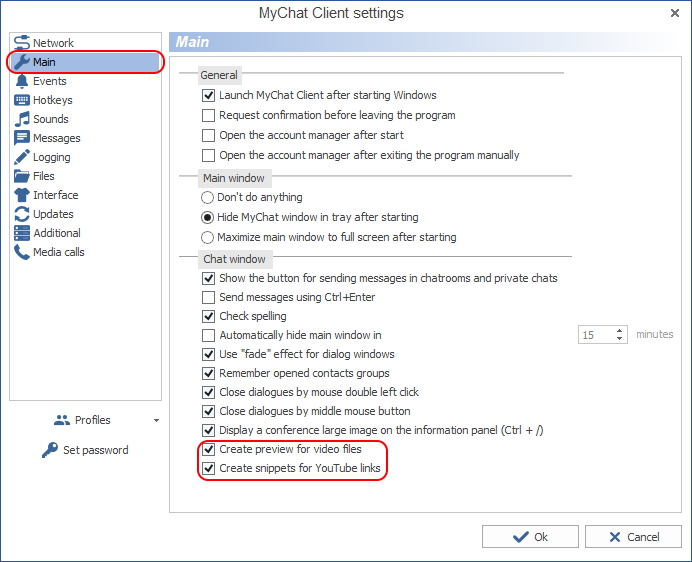
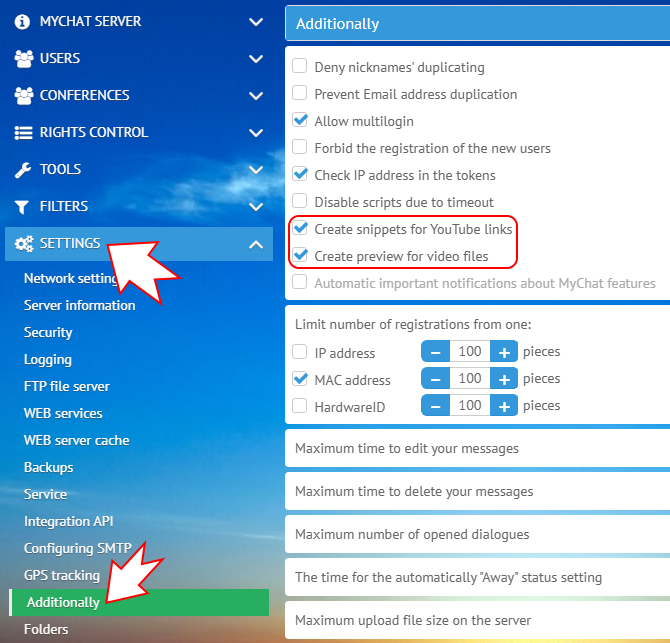
Settings that are provided for users: you can enable or disable the generation of snippets for YouTube links and thumbnails for video files. If a preview is not needed, the link or file is sent in the usual way, as before:
The same thing, but with higher priority, is also available on the server:
4. Quoting quotes and useful things

In the Windows client, quoting of already sent quotes — fully or partially, based on a selected fragment of text. This is convenient in long discussions when you need to respond not to the entire message, but to a specific thought within an already quoted block.
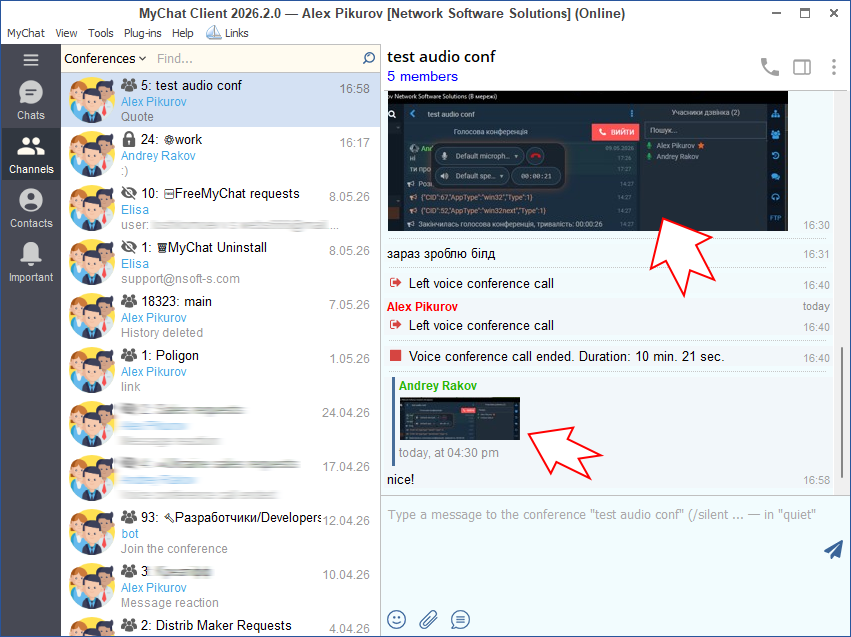
A smaller thumbnail is now used for quoting images, rather than the full-size image. The history becomes visually lighter and faster to read:
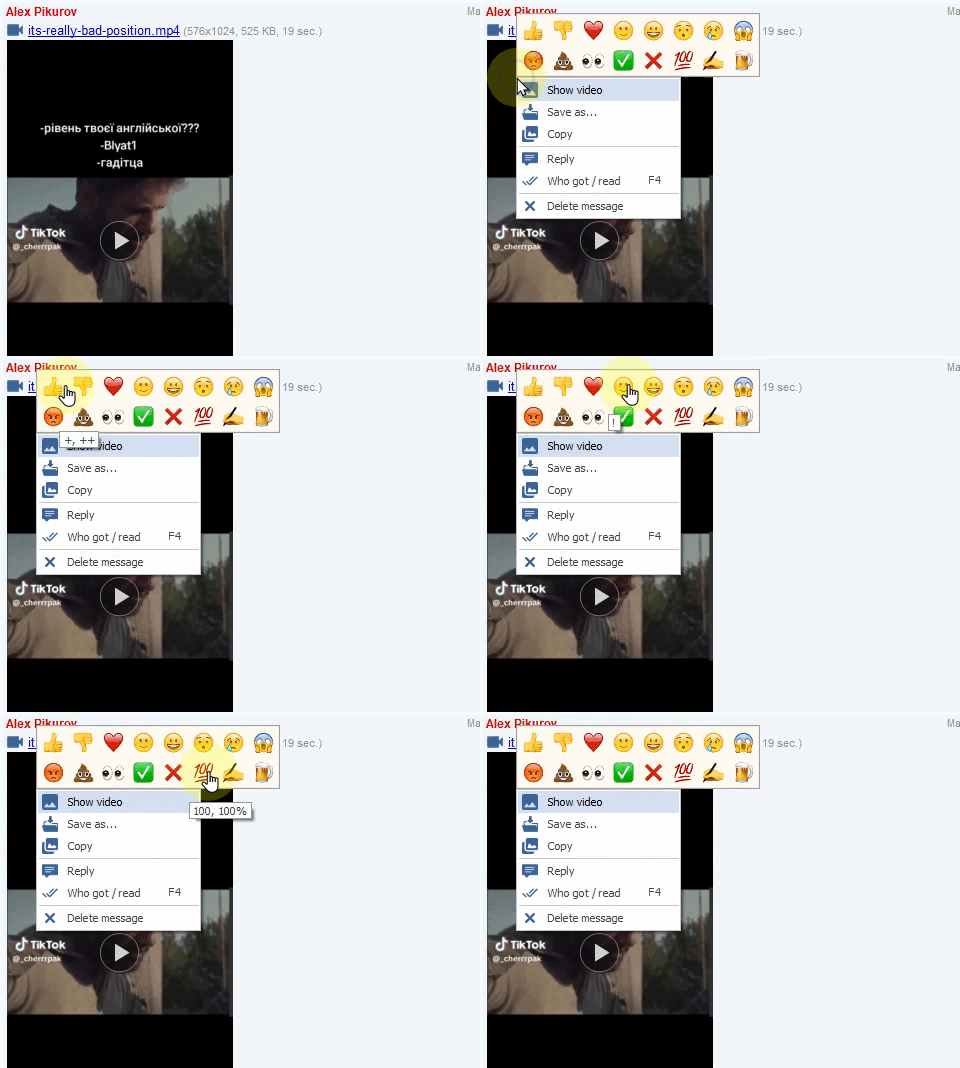
In the reactions window, hints for quick reactions that can be set from the keyboard: "+/++, -/- -, v, .." and others. This speeds up regular office messaging when you need to quickly confirm, agree, or mark a message without extra clicks, from the keyboard, without aiming the mouse at the message:
Voice detection are provided in private calls; the program shows when your subscriber is saying something:
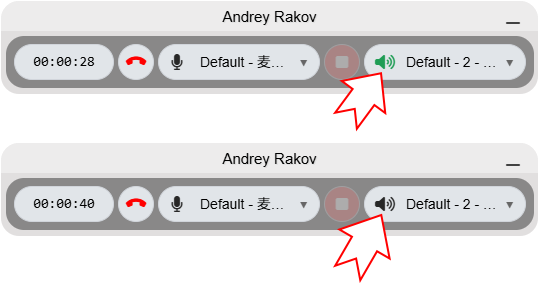
This can be useful if you chose the wrong device for sound output, for example, a monitor connected via HDMI that doesn't have built-in speakers. And it's not immediately clear what the problem is, and why the call seems to be going, but you can't hear the person.
5. Fixes and stability
MyChat Client for Windows now automatically removes a frozen nw.exe call plugin from memory if it remains after an unexpected termination. This reduces the possibility of strange situations during subsequent calls.
Fixed the message typing notification, which could sometimes be shown in the wrong place. Also fixed the complete deletion of private history with the built-in Elisa robot using Ctrl+Shift+Del. The option was there, but there was no reaction :) Now it's all OK.
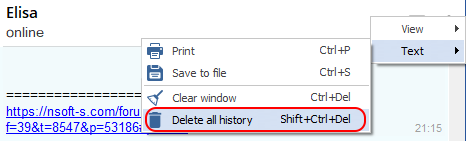
On the server, we have improved call termination when shutting down or restarting the web server, mixer, or TURN. Now calls end immediately without waiting for timeouts. Also fixed a bug where unexpected termination of a private call could cause message duplication in the chat. This was very annoying for people.
6. Full list of changes + development history
Development history with developers' comments
MyChat Client
[+] (win32) quoting quotes (in whole or a partly selected piece of text);
[+] (win32) voice conferences;
[+] preview for YouTube links;
[+] preview for video files in the chat;
[*] (win32) the program automatically removes the frozen call plugin nw.exe from memory if it remains from a previous emergency shutdown;
[*] (win32) the reaction setup window now shows hints for "quick" reactions that can be set using the keyboard (like "+", "-" or "v");
[-] (win32) the notification about typing could be displayed in the wrong place, fixed;
[-] (win32) full deletion of private history with the Elisa bot (Ctrl+Shift+Del) didn't work. Fixed;
MyChat Server
[*] if the web server, mixer, or TURN is shut down or restarted on the server, all calls are immediately terminated, without waiting for timeouts, as it was before;
[-] when a private call crashed, messages would often be duplicated in the chat (from one user or both). Fixed.
7. How to update to the latest version?
Both commercial and free versions are updated in the same way. The server is updated first, then the clients. In general, this process is performed automatically.
