


The main topics of this release are message forwards, Kanban updates, and a new free quiz bot based on movies.
- Message forwarding
- Updated Kanban project management system
- New Movie Quiz bot: guess a movie by frames
- Various improvements
- Full list of changes + development history
- How to update to the latest version?
1. Message forwarding
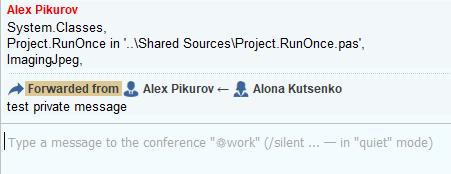
Right-click on a message in the chat and choose who you want to forward it to: to a conference, as a private message, or any other conversation type.
When forwarding, a recipient selection window opens. It intelligently remembers frequent recipients, but you can also filter all server users, your own conversations, contacts, and conferences. If you want additional context, you can add a short comment.
It has always been a common UX pain point that in messengers, the forward comment is sent first, and then the message itself. As a result, the comment itself gets lost. So we have implemented a better approach: first the forwarded message, and then the comment, if any.
Forwarded messages cannot be edited to avoid losing the original meaning. And if you forward a message that's already been forwarded, MyChat doesn't nest one message within another. The server takes the original content and creates a clean, single-level forward.
As usual, everything is controlled by permissions; you can prohibit message forwarding in private conversations and conferences using user group permissions.
Conferences are handled separately. If the message source is a hidden conference, the client should not allow the recipient to join it without access. The source name is displayed in the forward banner, but switching to the hidden conference is blocked for outsiders.
Forwarding to guest web support is also automatically disabled. This protects guest service conversations from accidentally sending internal information.
2. Updated Kanban project management system
The cards' appearance has been updated to provide better contrast and easier reading. Also, sorting and tag display within the tasks themselves:
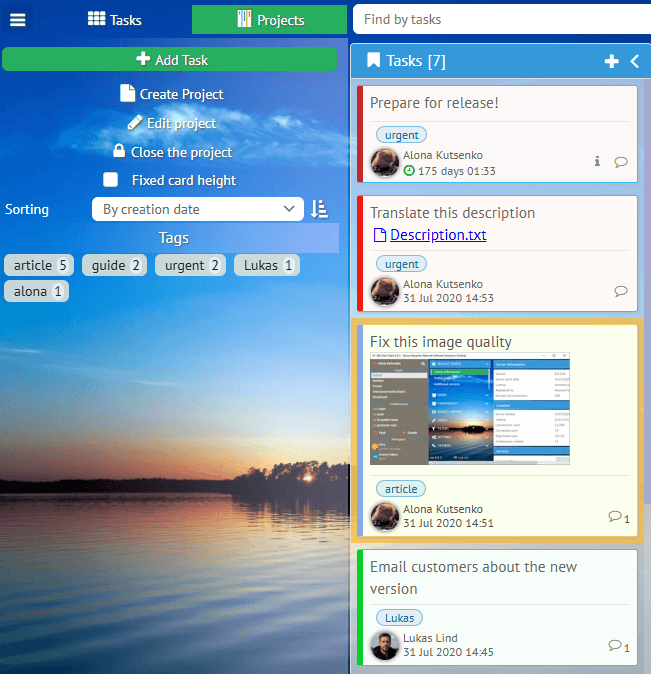
Tags let you quickly filter tasks across the entire project board.
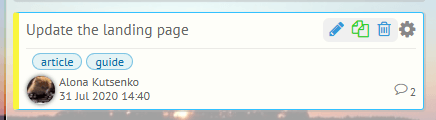
We've implemented a task copying mechanism. Notice that comments aren't transferred, only the task itself and its properties. This is convenient if you need to constantly complete routine tasks with minor differences:
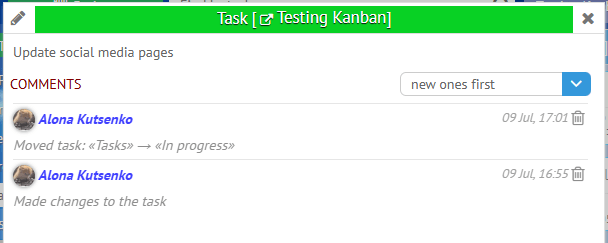
We've also implemented automatic comments about task actions. This is convenient for understanding the history of task progress through its stages, for example:
3. New Movie Quiz bot: guess a movie by frames
MyChat Server now has a quiz bot based on movie screenshots. It's free and included with MyChat Server, in both the commercial and free versions. It runs in a separate "Movie Quiz" conference that it creates automatically.
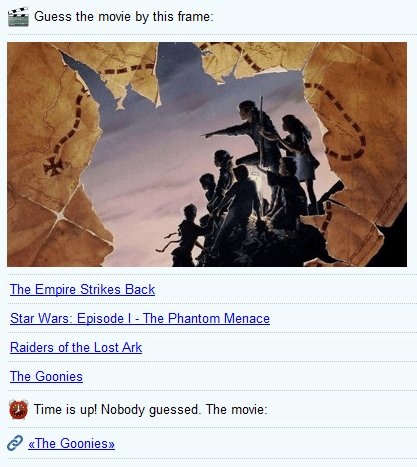
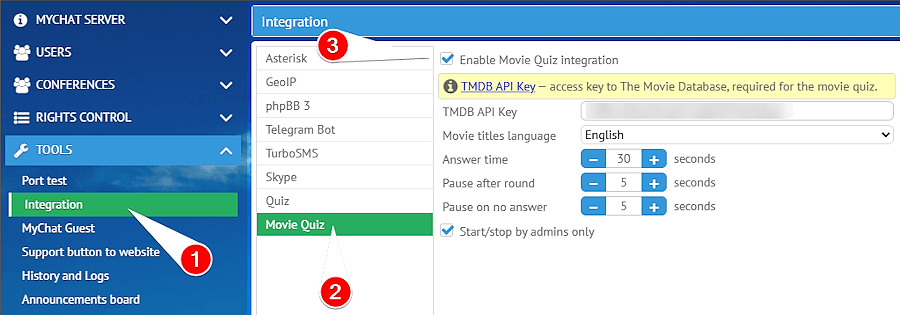
The bott pulls movie frames from TMDB service. To enable the integration, you need to register there and obtain a TMDB API key.
Control over start, stop, and restart is managed by administrators (there's a setting for that, if needed).
If the TMDB key is not specified or the server cannot connect to the service, the bot will send a clear message to the channel and suggest what needs to be checked.
4. Various improvements
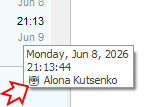
Icons for files without extensions that are sent to chat are rendered correctly. We've also added a display of the application type used to send the chat message:
And in the client applications for macOS and Linux, you can now choose a background image for the chat.
5. Full list of changes + development history
Development history with developers' comments
MyChat Client
[+] (alt, mac, linux) added chat message forwarding;
[+] (kanban) user avatars on cards and in comments;
[+] (alt, mac, linux) chat background selection: pre-defined options with saved selection;
[+] (kanban) task sorting (by creation date, due date, label);
[+] (kanban) task copying from the card menu;
[+] (kanban) automatic system comments when changing stages and modifying tasks;
[+] (admin) added movie quiz "Movie Quiz";
[+] (linux, mac, alt) added a setting to display the list of conferences and private conversations as bookmarks/lists;
[*] (win32) right-clicking on a file in chat, "Download and save as..." now opens Explorer with the file selected in the folder after successful saving;
[*] (win32) information about the type of application from which the chat message was sent. Displayed in the hint shown when hovering over the timestamp;
[*] (linux,mac,alt) the latest message is displayed in the conference list;
[-] (win32) the mechanism for sending reports regarding working time control was broken, fixed;
[-] (win32) an error that could sometimes create private conversations "with yourself" after several hours of work on servers with old history and database errors. Fixed;
[-] (win32) correct rendering of file icons without an extension sent to the chat;
MyChat Server
[+] message forwarding technology;
[+] (node) early detection of abnormal activity with warnings in the server log;
[*] (node) protection: control of spam login attempts from one address + UIN;
[*] (node) enhanced security for processing uploaded files (path-traversal);
[*] (node) added login protection against automatic password guessing;
[*] (node) increased web server resilience to abnormal loads;
[*] more accurate detection of busy ports at server startup, automatic program termination, and automatic opening of the Help page on the official website to clarify how to resolve the issue;
[-] on the admin panel, it was impossible to select a local IP address for the TURN server if the address was virtual rather than physical. Fixed;
[-] the list of tags in Kanban was incorrectly determined when receiving own and assigned tasks. Fixed.
6. How to update to the latest version?
Both commercial and free versions are updated in the same way. The server is updated first, then the clients. In general, this process is performed automatically.
