


In a corporate messenger, message history quickly turns into a separate knowledge base. It stores agreements, links, files, technical support responses, decisions on projects, and the very messages that "someone definitely wrote last month."
In MyChat 2026.4, we finally implemented a long-awaited feature: full-text search across message history, powered by fuzzy search technology. But this release is not only about search. We greatly accelerated and redesigned the Admin part, added normal server usage statistics with graphs, thoroughly optimized calls, made automatic background blur in video calls, prepared integration with Oracle PL/SQL, and translated the Windows client into German and Italian.
- Full-text search in message history
- Quick statistics and redesigned sections of the WEB Admin panel
- Improved calls and automatic background blur
- Integration with Oracle PL/SQL
- Windows client improvements, translation into German and Italian
- Full list of changes + development history
- How to update to the latest version?
1. Full-text search in message history
Now old messages can be searched instantly, across the entire history, as in a working knowledge base. Since the "dawn of time":
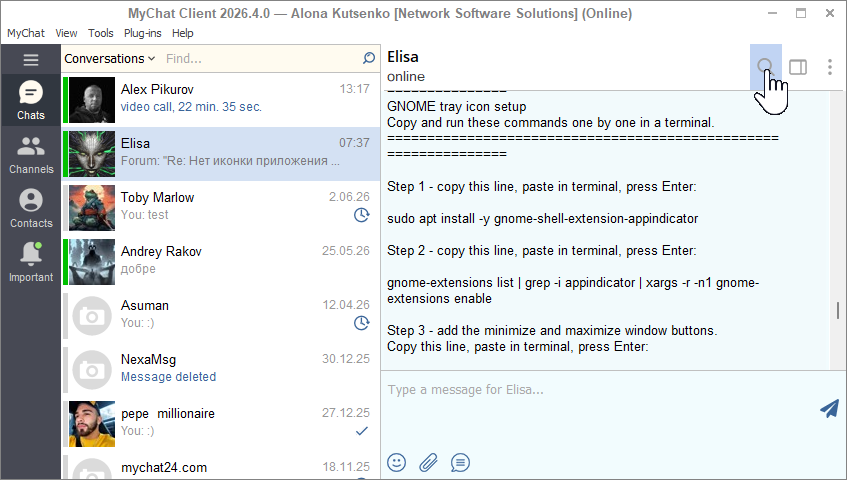
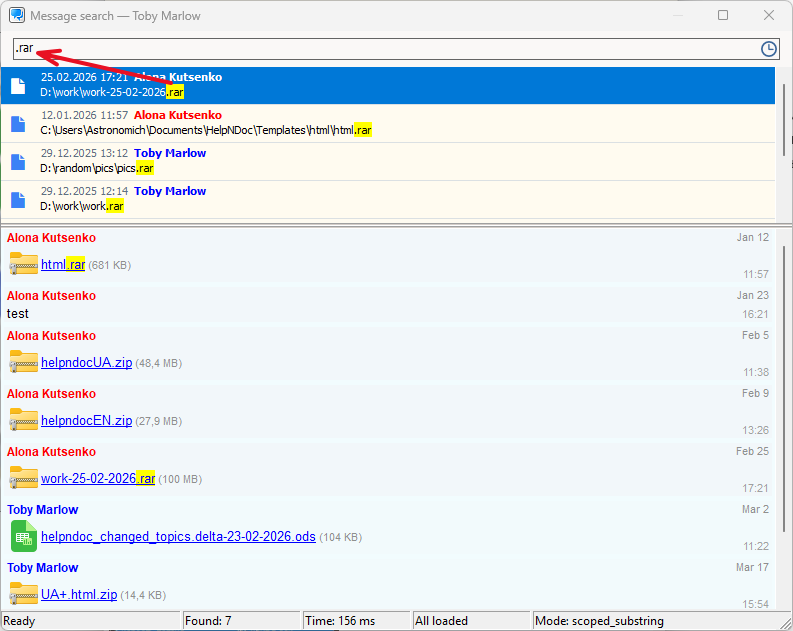
The search can work through private dialogues and conferences, supports exact phrases, filters by content type, date, sender, and gradual loading of results. For users, it looks simple: they enter a word or phrase, receive a list of found messages, open the desired result, and go to the context of the conversation.
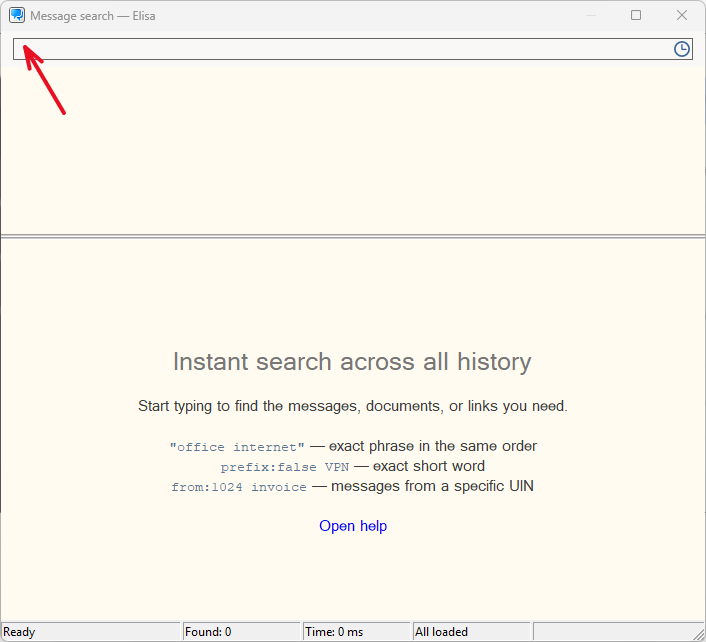
"Under the hood" is a separate indexation on the server, built using SQLite FTS technology. The primary message history remains the source of truth, and the search database is reassembled and maintained separately, but in a fully automatic mode. This is important: if something happens to the indexation, messages will not be lost, and the normal operation of the server should not depend on the search.
Full-text search provided for mobile devices too:
The search does not block the delivery of new messages. The results are sent in portions so that they can be seen immediately, even if the search query is very "broad". The system allows simultaneous requests from different users.
For simple queries, if you are not sure of the exact word or just misspelled it, there is a precise automatic fuzzy mode, but at the same time, the server does not try to "get smart" with a meaningless mess of letters.
The search results contain data for highlighting matches and correct visualization in the client.
If you have a long history, don’t worry, the server will gradually (in the background), without slowing down the server and saving resources, fully index messages, even if they have been accumulating for 10 years. In a couple of days, everything will be done automatically, and you won’t even notice. The full-text search database will be about 5 times larger in size than your server history.db. You can use the search immediately. All new messages are included in the index first.
This is the first large version of the search. We will expand it further, but it's already changed the feeling of working with a large history.
2. Quick statistics and redesigned sections of the WEB Admin panel
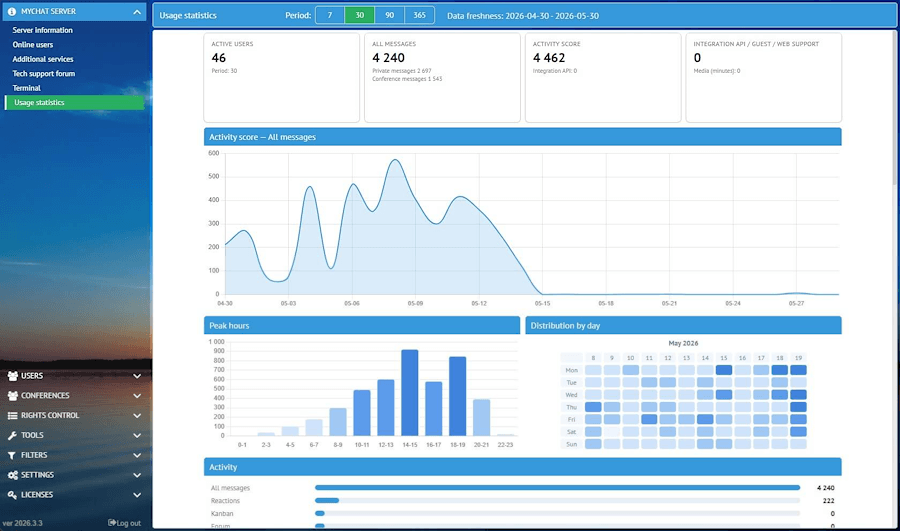
The new usage statistics section shows how active your messenger server is: messages, users, files, Kanban, forum, WEB-support, Integration API, calls, and other events. You can view periods for a week, a month, three months, and a year, see active and inactive users, company divisions, load peak, and event distribution.
It can be shown to both the director and the administrator himself, because real numbers are much better than "feelings".
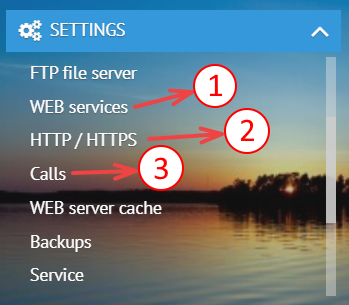
The WEB server settings have grown so much over time that we have divided them into several sections, according to their meaning: the web services themselves, ports and encryption, and TURN settings for calls.
Reading and searching have become easier:
3. Improved calls and automatic background blur
Video and audio calls on a corporate network are always a little more than a "call" button. There is NAT, multiple network interfaces, TURN, external addresses, mobile clients, and disconnections.
- improved TURN settings and relay address selection;
- process external-ip mapping more carefully;
- improved diagnostics and port checking;
- removed duplicates and ambiguities in addresses;
- improved completion and clearing of call states;
- sped up the start of video calls and calls with screen sharing by 30%;
- made separate edits for media conferences and private calls.
And for video calls, a very noticeable custom function has appeared - automatic background blur:
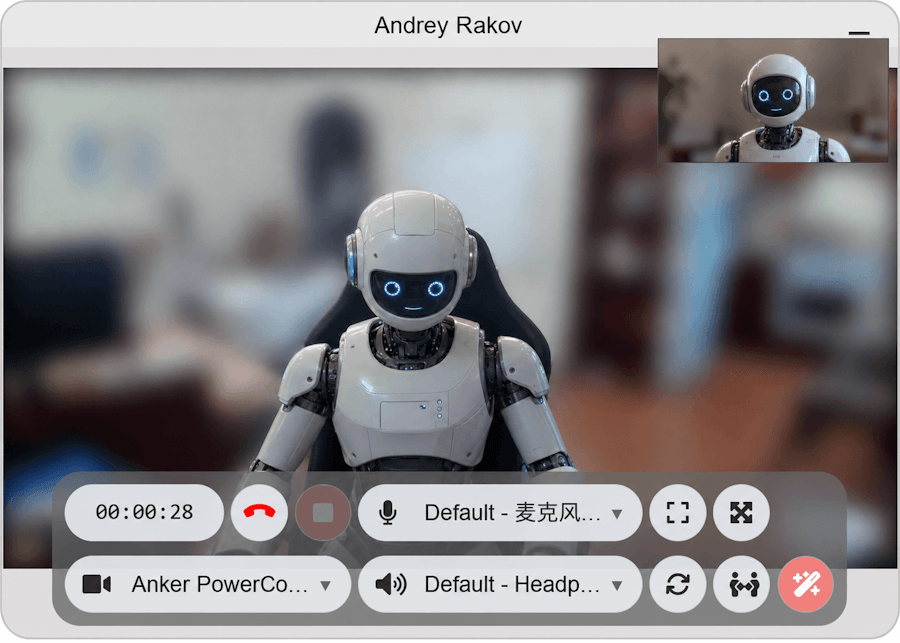
This is not for a show. In a corporate environment, people call from the office, home, meeting rooms, workshops, warehouses, and on business trips. Blurring the background helps to avoid showing too much and simply makes the video conversation calmer.
4. Integration with Oracle PL/SQL
For companies where Oracle is not just a database, but the center of business processes, we have prepared a separate PL/SQL package MYCHAT_API.
It allows sending messages from Oracle into a corporate chat using REST Integration API:
- as a private message to the user;
- as a message to a text conference.
The set includes installation_mychat_api.cmd, SQL scripts, auto-detection of the connection string to the local Oracle PDB via lsnrctl status, ACL configuration for HTTPS access to the MyChat Server, and examples of sending test messages.
Ready package, use it if needed.
The meaning is simple: an event in the database, a regulatory procedure, a report, a warning, or a business rule can send a message to a corporate chat, where it is needed, quickly and reliably, with one line of code in your SQL script.
5. Windows client improvements, translation into German and Italian
Imagine the chat window is in focus, for example, an employee opened the chat window and went to the kitchen, leaving the work chat on the screen. Typical story, we do it all the time :)
And "suddenly" a new incoming message arrives. The program has become smarter and now does not automatically send the "read" status until a person shows some activity on the computer. The default activity time is set to 30 seconds.
It's a small but convenient thing.
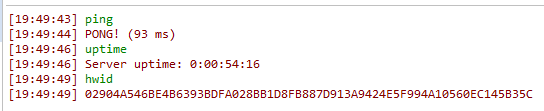
Also, the text of sent commands in the console (Ctrl+`) now appears instantly without delay and is highlighted in a separate color:
Added new translations of the program interface and messages into German and Italian.
Important: German and Italian translations are marked as AI translations. This is already a useful database for users and partners, but we will be grateful for edits from native speakers.
5. Full list of changes + development history
Development history with developers' comments
MyChat Client
[+] (win32) the program interface and messages translated to German and Italian languages;
[+] (win32) full-text search across the entire history of conference and private messages;
[*] (win32) if the chat window is in focus during an incoming message, the program does not automatically send the "read" status until the person shows some activity;
[*] (win32) text of sent commands in the console (Ctrl+`) now appears instantly without delay and is also highlighted by a different color;
[*] (win32) list of TURN server addresses for calls is now formed without duplication; the current server address is first in the list;
[-] (win32) fixed placement for call buttons and service buttons on top of the chat panel after hiding/showing them;
MyChat Server
[+] (core) integration with Oracle PL/SQL;
[+] (admin) extended statistics of server usage in the form of graphs and diagrams;
[+] (core) full-text searh technology (FTS);
[+] (admin) technology for checking if UDP ports for calls are accessible from the internet;
[*] (core) traffic compression (deflate) for all web services, which provides significant acceleration when opening pages for the first time and subsequent work in the Admin panel, chat, Help, Kanban, and forum;
[*] (admin) updated server console ("MyChat Server" -> "Terminal"), improved color markup, input line is moved to the bottom of the screen;
[*] (core) safer file upload/download using a special sid token;
[*] (core) WatchDog records log into special folder for server system logs sorted by years, months, and days;
[*] (core) improved automatic configuration for TURN server: external IP or server domain name added first, and the list of relay addresses is formed without duplications;
[*] (core) for clients, NodeJS, and server search replies receive a valid list of relay addresses of the TURN server for calls;
[*] (admin) added client error #0405: invalid range of UDP ports of the TURN server;
[*] if log level "debug" is on, then a watchdog file is written not in one file in the log root, but sorted by dates, yyyy\mm\dd\. Also, the "debug" mode is not disabled automatically after midnight, but only "trace" (which reverts to "info").
6. How to update to the latest version?
Both commercial and free versions are updated in the same way. The server is updated first, then the clients. In general, this process is performed automatically.
