


A new version of MyChat 2026.1.0 is a calm and regular update without any specific features. However, there are a lot of improvements for the Admin Panel, built-in Kanban board, and website support. Also, more helpful improvements for many parts of the product: client applications and MSL scripts. Such releases enhance the everyday work process with stability, convenience, and attention to detail.
- Client applications: Android, iPhone/iPad, Windows, and alternative client
- Server part of the Admin panel and tools for administrators
- Kanban and server scripts
- Various improvements
- Full list of changes + development history
- How to update to the latest version?
1. Client applications: Android, iPhone/iPad, Windows, and alternative client
A client part of this release received a lot of changes for a couple of platforms. We added a dark theme and settings for recording calls in the alternative client. In the default Windows client, we improved processing of internal messages to reduce risks of program freezes; redesigned the mechanism for getting HardwareID for better compatibility with virtual systems.
Android client received a significant set of changes. Now you can use the dark theme that has automatic switch via system settings or turn it on manually in parameters.
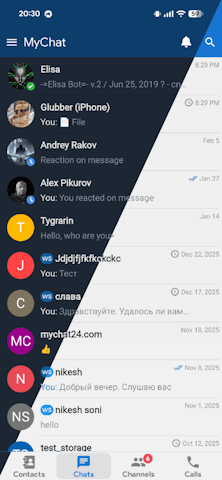
Added option to change interface language directly in settings. Moreover, the application became smaller by 40% after optimization. 16 KB page size makes launching and working faster on modern devices. Enhanced work with logs: added automatic cleaning of old files, better viewer, and option to archive log files for sending them via the menu "Share".
iPhone and iPad display broadcasts in a separate list of received broadcasts:

Improved image cache process, and added an option to send up to 10 images or files simultaneously. Mobile clients now process a server rule that limits the maximum time period for deleting their own messages.
Multiple bug fixes in this update. For example, Android applications no longer have issues with image display in replies and network activity limitation in Android 15+, which caused disconnection from the server after opening the screen for choosing files. In the Windows client, we fixed the issue when the program sometimes attempted to send a request to the server after a physical disconnection.
2. Server part of the Admin panel and tools for administrators
In MyChat Server's terminal, you can select text and use the default context menu with the option to copy. A log viewer is provided with text search. For those who use scripts, can appreciate some improvements too: Ctrl+F1 on a function in the editor opens a Help page; the script tree correctly adapts when changing the window width, and the editor remembers the height of the log text console.
There are several helpful options for user administration. When importing users from a domain, you can use commands "Select all", "Deselect", and "Invert selection" (and hotkeys for these actions). In the user group manager, we added multi-selection, and in the group contents, there is a filter by users. These changes may seem minor, but they save time for administrators.
It is worth mentioning improvements in the server's core. Previously, we added technology for automatic database rollback detection for history and cache auto-synchronization on clients. And the message sending speed became better due to optimization of the data compression algorithm. Now the server's log system uses the same level scheme as clients: FATAL, ERROR, WARN, INFO, DEBUG, TRACE.
3. Kanban and server scripts
Built-in kanban is now provided with an automatic fuzzy search technology. Usual priorities (regular/important/critical/urgent…) are replaced with 30 markers. In the project properties, you can change their names and colors. That makes boards more flexible and convenient for teams who use Kanban casually as an everyday work tool, setting it up according to their needs.
Fixed issues that deal with rights and data display in Kanban. Thus, fixed notification when attempting to log in without sufficient rights, and solved the limitation of work for viewing only personal tasks. Removed the error for incorrect task creation time display without UTC.
MSL scripts now provide new functions for working with string cache in memory — MemCacheExists, MemCacheGet, MemCachePut. Also, a new set of asynchronous HTTP requests: HTTPSendGetMessageAsync, HTTPSendPostMessageAsync, and system functions: CreateGUIDString and ScriptSleep. For those who use a built-in script engine in integration, automation, and internal services, these scripts will be a practical way for extending abilities.
4. Various improvements
Solved problems occurred in website support: render for quoted messages, message delivery status when opening a new private dialogue from the website, and the error when attempting to open a private dialogue with a user that is not included in the list of web support operators.
Updated mechanism for file cache in the built-in web server. Optimized automatic generation of TURN server settings to improve the quality of calls. All of these deal with internal technical changes that you may not notice directly, but they are important for general stability and better system exploitation.
5. Full list of changes + development history
Development history with developers' comments
MyChat Client
[+] (alt) dark theme in the alternative client;
[+] (alt) settings for recording calls in the alternative client;
[+] (android) added dark theme. Available both automatic theme change depending on system settings and a manual option in the application settings;
[+] (android) added option to change language in the app settings;
[+] (ios) added broadcast notification display;
[+] ios) added list of received broadcasts;
[*] (win32) improved technology for processing internal messages that reduced the risk of application freezes;
[*] (win32) redesigned technology for obtaining HardwareID for better compatibility with virtual systems;
[*] (ios) added option to add up to 10 images/files simultaneously;
[*] (ios) improved image caching during work: display optimization in private dialogues and conferences;
[*] (android) reduced application size by 40% due to optimizations;
[*] (android) supported 16KB page size — the application launches and works faster;
[*] (android) added automatic cleaning of outdated log files;
[*](android) changed application logs viewer: now you can switch between log types without closing the view screen;
[*] (android) application logs can be archived into a ZIP file for sending via the system menu "Share";
[*] (win32) more correct analysis of the existence of the folder for receiving files. If it does not exist or is temporarily unavailable, the default folder is used in “\My Documents\MyChat\”;
[*] (win32) improved rendering for conference history with a lot of consecutive technical messages that are not visible but still have an impact on history (reactions, deleting/editing messages);
[*] (win32) removed settings for disabling the storage of local caches of message history;
[*] (android) (ios) added processing for the rule "Maximum time for deleting own messages";
[-] (win32) ID: FF912FBB. Sometimes the program attempts to send a request to the server while disconnected. Fixed;
[-] (android) in Android 15+, after launching the file/image selection window, the system restricts network activity after a few seconds, leading to a server disconnection. Added a mechanism to avoid this restriction;
[-] (android) images did not display in message replies. Fixed;
[-] (win32) if the history window (Alt+H) is open and there is a new message in an open conference or private chat, the new message won't appear in the chat after closing the history window — you need to switch to another private chat or conference and then return. Fixed;
[-] (win32) ID: 0CBB49B9. If you right-click on a sent file in chat and select "Save As...," and the original file is currently being used by another program in exclusive mode, a notification will appear;
[-] (android) on Android 14+, an incoming call does not start before receiving permission to use a camera or microphone. Fixed;
[-] (android) on Android 15+, audio stops working for another user when minimizing the application. Fixed;
MyChat Server
[+] (admin) selecting text in the terminal tool on the server and the default context window with the option to copy;
[+] (admin) log viewing tool supports text search;
[+] (kanban) fuzzy search technology is automatically enabled;
[+] (msl) script functions to work with string cache in memory: MemCacheExists, MemCacheGet, MemCachePut;
[+] (msl) script functions for asynchronous GET and POST requests: HTTPSendGetMessageAsync, HTTPSendPostMessageAsync;
[+] (msl) system script functions CreateGUIDString и ScriptSleep;
[+] (admin) user filter in the contents of groups on the server Admin panel;
[+] (core) technology for automatic rollback of the server databases for auto synchronization of the chat history and cache;
[*] (admin) in a script editor, using Ctrl+F1 on a function opens a Help page with text about this function;
[*] (kanban) priorities replaced with markers, a total of 30 to choose from;
[*] (kanban) project properties allow changing names and colors for markers;
[*] (web) improved mechanism for file cache on a built-in server;
[*] (turn) optimization for automatic generation of TURN server settings to improve the quality of calls;
[*] (admin) resizing a script tree when changing its width;
[*] (admin) script editor: the height of the text console logs is remembered and can be changed by dragging the splitter with the mouse;
[*] (admin) import of users from a domain: added context menu, "Select all", "Deselect", "Invert selection", and hotkeys for these actions;
[*] (admin) the option for displaying thumbnail sizes of images in the chat has been finished in the client settings template tool;
[*] (admin) user group management tool: multi-selection of several positions for further deletion;
[*] (core) increased the speed of message sending to clients by optimizing the data compression algorithm;
[*] (admin) updated system of logging on the server related to the one used on the client (FATAL, ERROR, WARN, INFO, DEBUG, TRACE);
[*] (core) installation and update process for the server is three times faster due to Help optimization;
[*] (admin) user import from CSV: the system automatically detects a delimiter and file encoding;
[*] (admin) when importing users from a file (“Users”, “Import users from file”), it is now possible to change the text encoding right away;
[-] (websupport) processing for the error #248: you can't open a private dialogue with the user UIN XXX because he is not included in the WEB support operators list;
[-] (websupport) renderer for quoted messages did not work. Fixed;
[-] (websupport) message delivery status did not display when opening a new private dialogue on the website. Fixed;
[-] (admin) "Users". If you select multiple users and delete them, the top right corner must display "Users deleted" instead of "User deleted." Fixed;
[-] (admin) error when changing conference type (password-protected, hidden) in autocreated conferences when adding a new group. Fixed;
[-] (kanban) displaying a notification for error when logging in Kanban if a user does not have enough rights for this action;
[-] (kanban) a rule for limiting viewing only "own" tasks in project stages (tasks created by a user or assigned to them) does not work correctly. Fixed;
[-] (admin) If you change a conference topic in the list of automatically created conferences that had the "Include all" flag, this flag is cleared. Fixed;
[-] (admin) option for specifying lines with headers works incorrectly when importing users from a CSV file. Fixed;
[-] (kanban) in the list of tasks, a task creation date is displayed without UTC, fixed;
[-] (skype import) when importing a list of users invited to a conference, the accounts are duplicated in MyChat. Fixed;
[-] (core) error when saving the token in the database for access to the built-in forum, fixed.
6. How to update to the latest version?
Both commercial and free versions are updated in the same way. The server is updated first, then the clients. In general, this process is performed automatically.
