A list of active (online) text conferences on MyChat Server
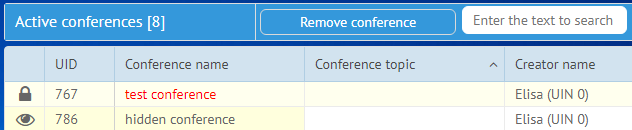
A list of working conferences
Here you can see a list of all text conferences that are currently on the server and have at least one user in them. View information about conference unique identifier (UID), name and topic, creator and time of creation, number of people, number of sent messages.
See if it's allowed to leave the conference, its type (automatic adding of all user to groups of free entrance), synchronization status, if there is a password for entrance.
You can delete any conference from the list. In this case all users will be automatically kicked out.
Connection type
- "All users" — the server connects all users (except users from web support) to a conference. It's impossible to leave such a conference because the server forcibly connects people to it. It's convenient if you need a place with all employees in it.
- "By groups" — also an automatic connection of people, but by groups that you pick manually. If a user joins one or more groups, then the server will add them to a conference. A user can't leave such a conference.
- "Free access" — any conferences created by users, but not by admins. Common, hidden, or secured by a password — it does not matter. The important part is that users can join them on their own (or by invitation) and leave anytime.
Conference users. How to manage them?
If you press on some conference, a list of users will be displayed on the bottom of the window. You can kick any user from the conference (except Elisa the built-in bot, if a conference is created automatically). You can also view conference password, if it's hidden from third-party access.